Requirements & scope
Problem Statement & Requirements
Design a cloud file synchronization service that keeps files consistent across multiple devices, supports sharing and collaboration, and provides reliable cloud storage — similar to Dropbox, Google Drive, OneDrive, or iCloud Drive.
Functional Requirements
- Upload / download files — store files of any type up to 50 GB in the cloud
- Automatic sync — changes on one device automatically propagate to all other devices linked to the same account
- Offline support — users can edit files offline; changes sync when connectivity resumes
- File versioning — maintain history of file versions; revert to any previous version
- Sharing — share files/folders with other users via link or direct permission (view/edit)
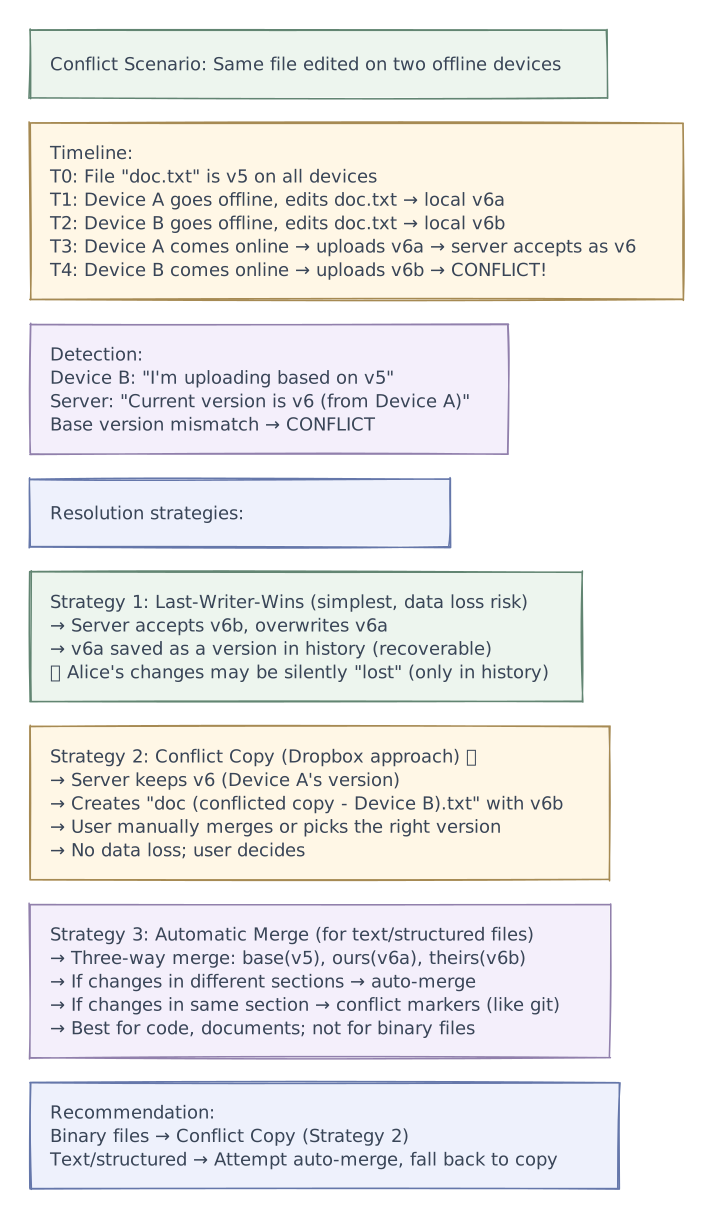
- Conflict resolution — handle simultaneous edits to the same file on different devices
- Folder structure — hierarchical folders with move, rename, delete operations
- Notifications — notify users when shared files are modified
- Search — search files by name, content, and metadata
- Trash / recovery — deleted files recoverable for 30 days
Non-Functional Requirements
- Consistency — all devices must eventually converge to the same state
- Low latency sync — changes propagate to other devices within seconds
- Bandwidth efficiency — only transfer changed portions of files (delta sync), not entire files
- Reliability — 99.999999999% (11 nines) durability for stored files
- Scalability — 500M users, 100B files, exabytes of storage
- Availability — 99.99% for upload/download; sync can tolerate brief delays
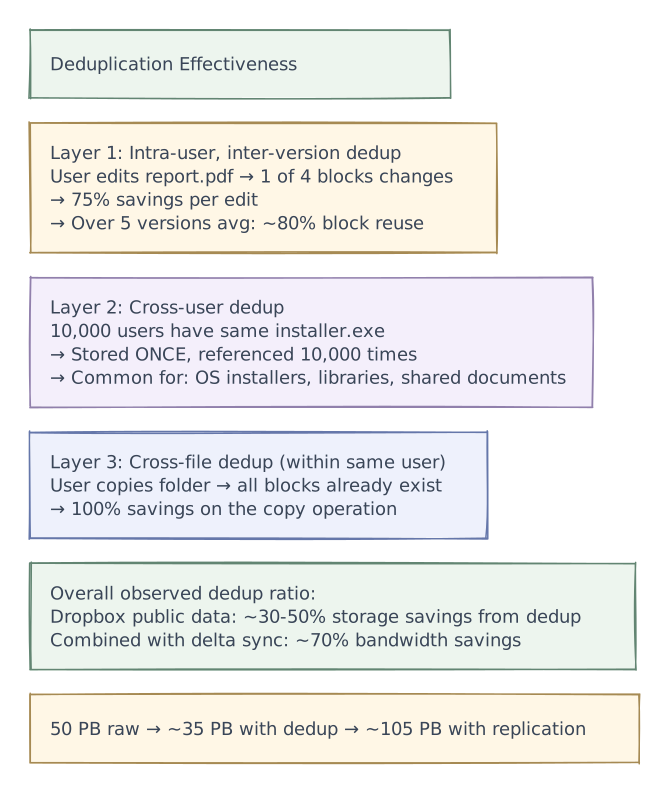
- Deduplication — identical files/blocks stored once (cross-user dedup)
Out of Scope
- Real-time collaborative editing (Google Docs — see Real-Time Collaboration design)
- Photo-specific features (albums, face recognition)
- Video transcoding or streaming
- Enterprise DLP / compliance features
Scale estimations
Scale Estimations
Traffic
| Metric | Value |
|---|---|
| Total users | 500M |
| Daily active users | 100M |
| Average files per user | 200 |
| Total files | 500M × 200 = 100B files |
| Average file size | 500 KB (heavily skewed: many small, few large) |
| File uploads / day | 500M (new + modified) |
| File uploads / second | ~5,800 RPS |
| File downloads / second | ~15,000 RPS |
| Sync metadata operations / second | ~100K RPS (file list, status checks) |
| Peak sync traffic (9am workday start) | 3× average |
Storage
| Metric | Value |
|---|---|
| Total raw file storage | 100B × 500 KB = ~50 PB |
| With deduplication (~30% savings) | ~35 PB |
| With replication (3×) | ~105 PB raw storage |
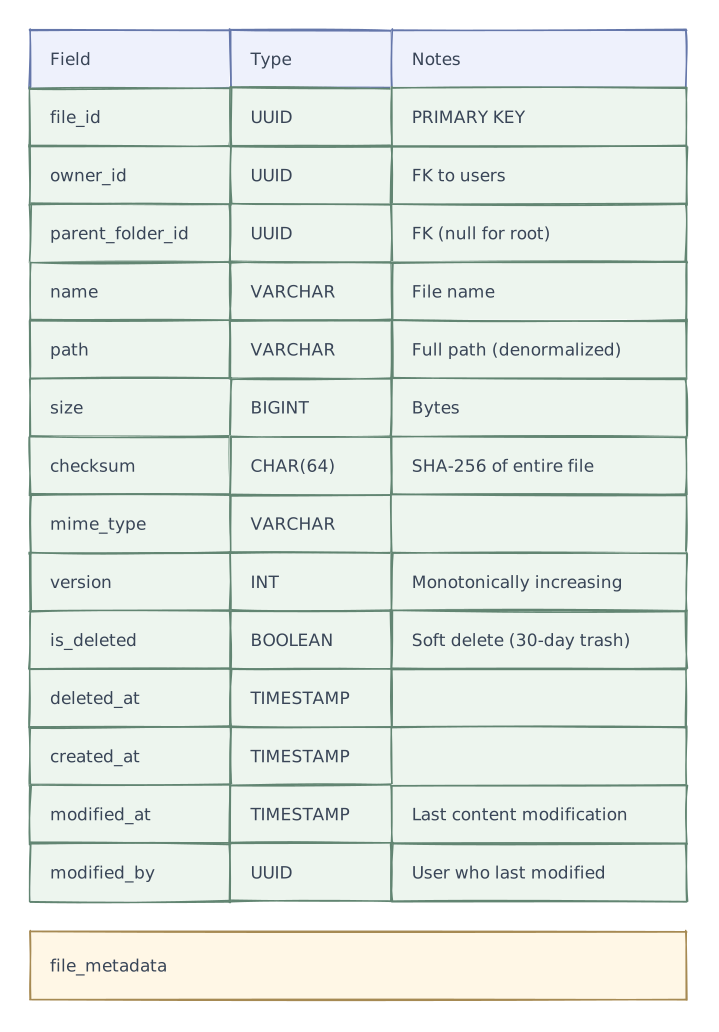
| File metadata per file | 500 bytes (name, size, hash, timestamps, permissions) |
| Total metadata | 100B × 500 B = ~50 TB |
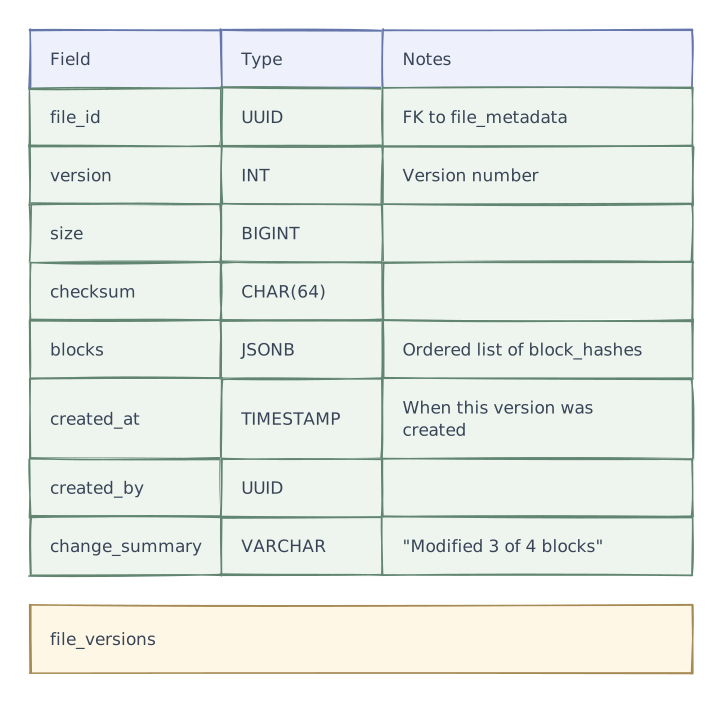
| Version history (avg 5 versions/file) | 500B versions × 200 B each = ~100 TB metadata |
| Block metadata (for chunked files) | ~20 TB |
Bandwidth
| Metric | Value |
|---|---|
| Upload bandwidth (5.8K/s × 500 KB avg) | ~2.9 GB/s |
| Download bandwidth (15K/s × 500 KB avg) | ~7.5 GB/s |
| Delta sync savings (~70% less data transferred) | Effective: ~3 GB/s total |
| Sync notification bandwidth | ~50 MB/s |
Hardware Estimate
| Component | Spec |
|---|---|
| API / sync servers | 100-200 (stateless) |
| Metadata database | 50-100 shards (SSD-backed PostgreSQL) |
| Block storage (object store) | Thousands of nodes (HDD-based, S3-style) |
| Notification / sync push | 50-100 WebSocket servers |
| Dedup index | 20-30 nodes (hash → block_id lookup) |
| Search index | 30-50 nodes (Elasticsearch) |
Layered architecture
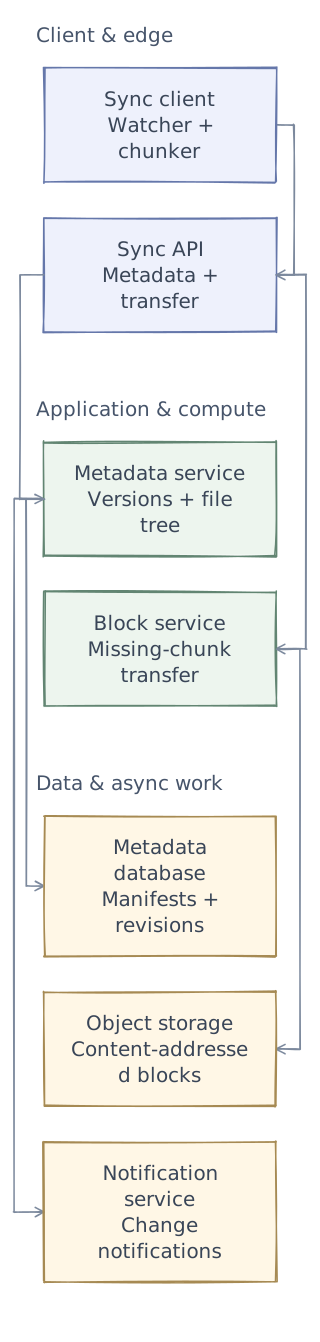
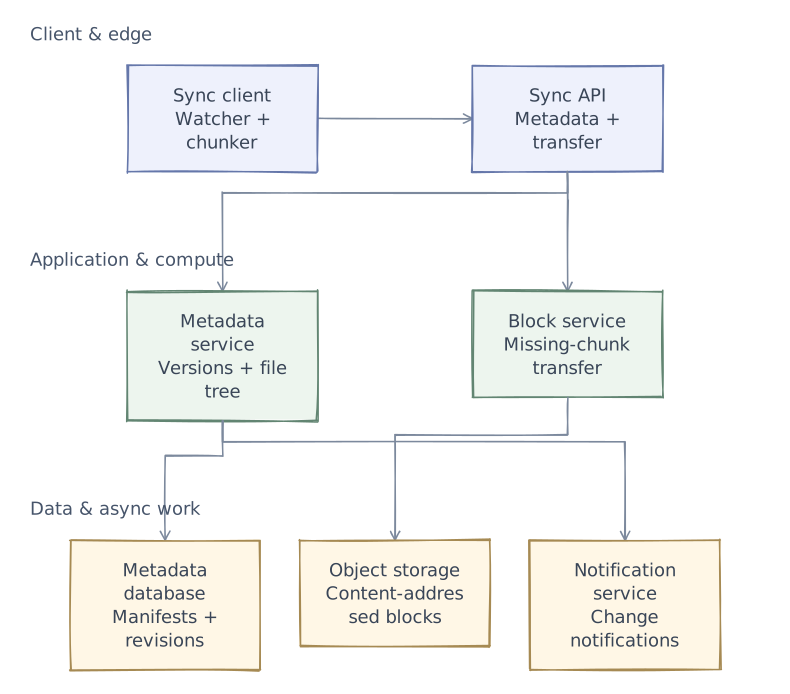
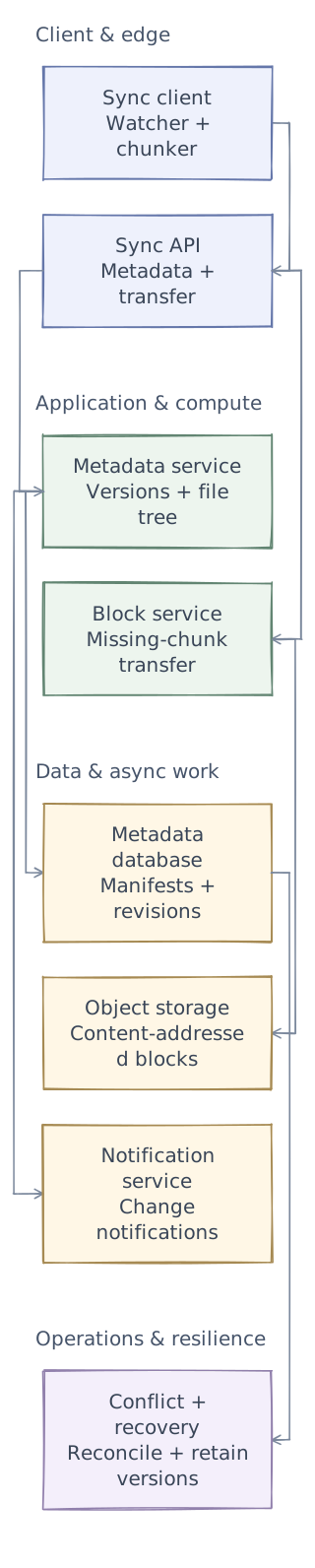
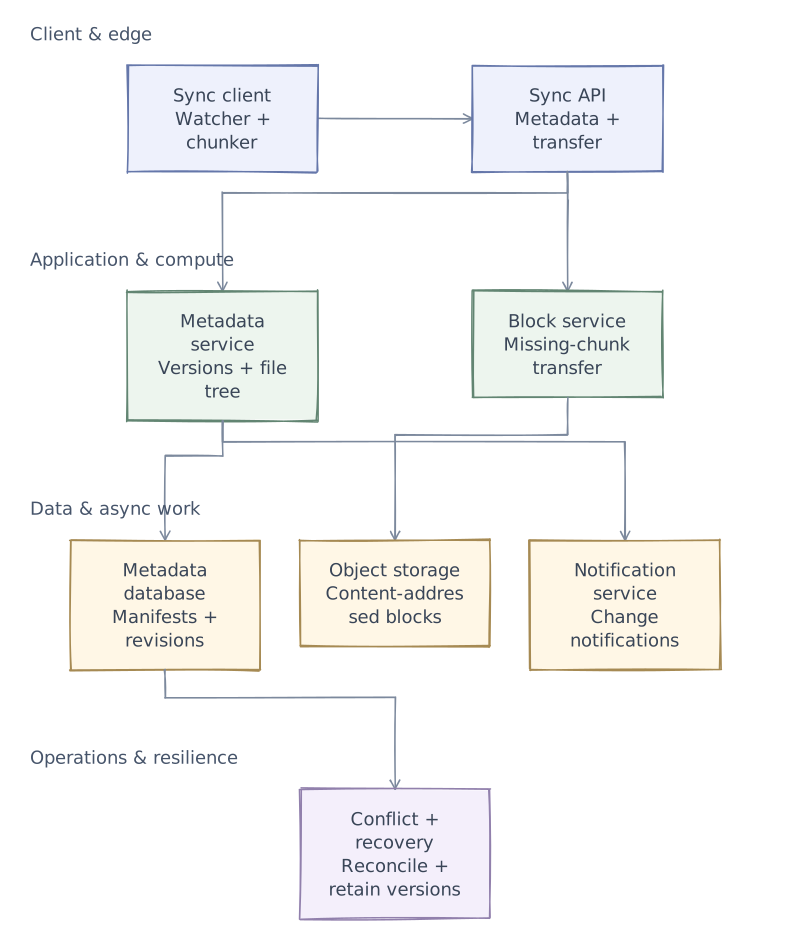
Phase 1 of 4 · Client & edge
Start with the entry points
First, define who uses the system and where requests enter. This is the boundary of the design, not yet a complete request path.
- Sync client
- Watch local changes, chunk files, and keep a local manifest to detect what actually changed.
- Sync API
- Authenticate operations and separate metadata traffic from bulk block transfer.
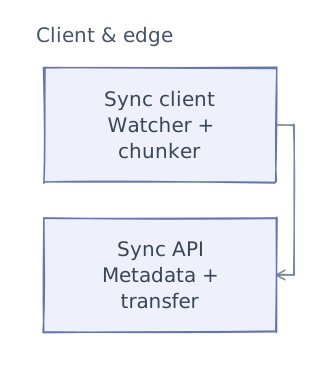
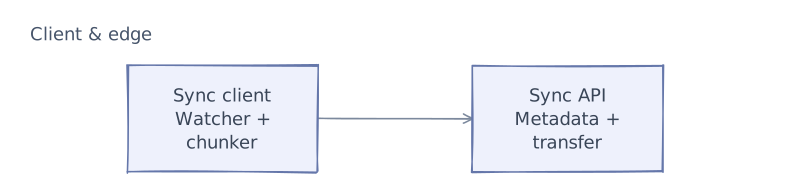
This first layer defines the system boundary. The next chapters add application logic and data dependencies. After examining the request paths and tradeoffs, we will add operational safeguards and bring the complete architecture together.
API & contracts
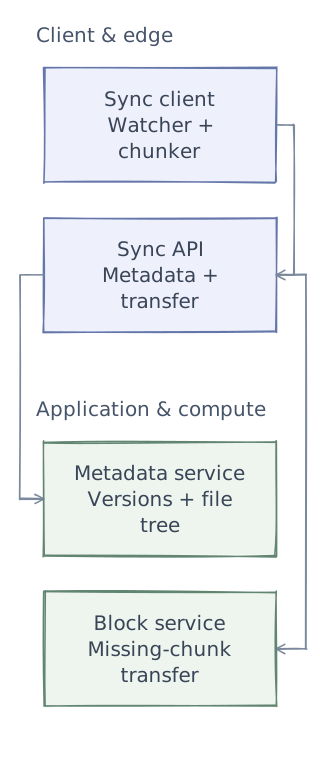
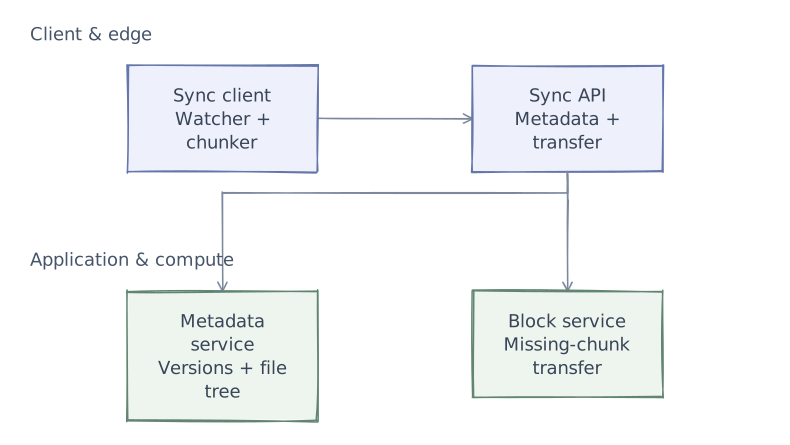
Phase 2 of 4 · Application & compute
Add the application logic
Keep the entry points and add the services that do the work. Give each service a clear responsibility before defining its contracts. Storage and background dependencies come next.
- Metadata service
- Use version checks to detect concurrent updates rather than blindly applying last-write wins.
- Block service
- Upload only chunks absent from storage and validate content hashes.
API Design
Upload File (Chunked)
Step 1: Initiate Upload
POST /api/v1/files/upload
Authorization: Bearer <token>

Request:
{
  "path": "/Documents/report.pdf",
  "size": 15728640,                    // 15 MB
  "checksum": "sha256:a1b2c3d4...",
  "modified_at": "2026-04-03T10:00:00Z",
  "parent_folder_id": "folder-docs-123"
}

Response (200 OK):
{
  "file_id": "file-abc123",
  "upload_id": "upl-xyz789",
  "blocks_needed": [                   // server tells client which blocks it doesn't already have
    {"block_hash": "sha256:block1...", "offset": 0, "size": 4194304},
    {"block_hash": "sha256:block3...", "offset": 8388608, "size": 4194304},
    // block2 already exists (dedup!) — not listed
  ],
  "upload_urls": [                     // presigned URLs for direct-to-storage upload
    {"block_hash": "sha256:block1...", "url": "https://storage.example.com/upload/..."},
    {"block_hash": "sha256:block3...", "url": "https://storage.example.com/upload/..."}
  ]
}

Step 2: Upload Blocks (parallel, direct to object storage)
PUT https://storage.example.com/upload/...
Content-Type: application/octet-stream
<block binary data>

Response: 200 OK, ETag: "block1-etag"

Step 3: Commit Upload
POST /api/v1/files/upload/{upload_id}/commit
{
  "blocks": [
    {"block_hash": "sha256:block1...", "etag": "block1-etag"},
    {"block_hash": "sha256:block2...", "etag": "existing"},    // deduped
    {"block_hash": "sha256:block3...", "etag": "block3-etag"},
    {"block_hash": "sha256:block4...", "etag": "existing"}
  ]
}

Response (200 OK):
{
  "file_id": "file-abc123",
  "version": 3,
  "size": 15728640,
  "modified_at": "2026-04-03T10:00:00Z"
}
Download File
GET /api/v1/files/{file_id}/content
Authorization: Bearer <token>
Range: bytes=0-4194303        // optional: download specific block range

Response (200 OK / 206 Partial):
Content-Type: application/pdf
Content-Length: 15728640
<binary file data>

OR for large files, client downloads blocks in parallel:
GET /api/v1/files/{file_id}/blocks
→ Returns list of block hashes + presigned download URLs
→ Client downloads blocks in parallel, assembles locally
Get File Changes (Sync)
GET /api/v1/sync/changes?cursor=eyJsYXN0IjoiY2hhbmdlXzEyMzQ1In0=

Response (200 OK):
{
  "changes": [
    {
      "type": "file_modified",
      "file_id": "file-abc123",
      "path": "/Documents/report.pdf",
      "version": 3,
      "size": 15728640,
      "checksum": "sha256:a1b2c3d4...",
      "modified_at": "2026-04-03T10:00:00Z",
      "modified_by": "user-alice"
    },
    {
      "type": "file_created",
      "file_id": "file-def456",
      "path": "/Photos/vacation.jpg",
      "version": 1,
      "size": 3145728
    },
    {
      "type": "file_deleted",
      "file_id": "file-ghi789",
      "path": "/Documents/old-draft.docx"
    },
    {
      "type": "folder_moved",
      "folder_id": "folder-jkl012",
      "old_path": "/Projects/2025",
      "new_path": "/Archive/Projects-2025"
    }
  ],
  "cursor": "eyJsYXN0IjoiY2hhbmdlXzk5OTk5In0=",
  "has_more": false
}

// Client uses cursor for incremental sync
// On first sync: cursor=null → returns all files
// Subsequent syncs: cursor from last response → returns only changes since
Share File
POST /api/v1/files/{file_id}/share
{
  "shared_with": [
    {"user_id": "user-bob", "permission": "edit"},
    {"user_id": "user-charlie", "permission": "view"}
  ],
  "link_sharing": {
    "enabled": true,
    "permission": "view",
    "expires_at": "2026-05-01T00:00:00Z",
    "password": "optional-password"
  }
}

Response (200 OK):
{
  "share_id": "share-xyz",
  "link": "https://drive.example.com/s/abc123xyz",
  "permissions": [
    {"user_id": "user-bob", "permission": "edit"},
    {"user_id": "user-charlie", "permission": "view"}
  ]
}Data model
Phase 3 of 4 · Data & async work
Connect data and background work
The services now need their dependencies: durable state, fast lookups, or work that continues outside a request. Separate these responsibilities rather than treating every component as a database.
- Metadata database
- Persist ordered file revisions and references to chunks so clients can resume safely.
- Object storage
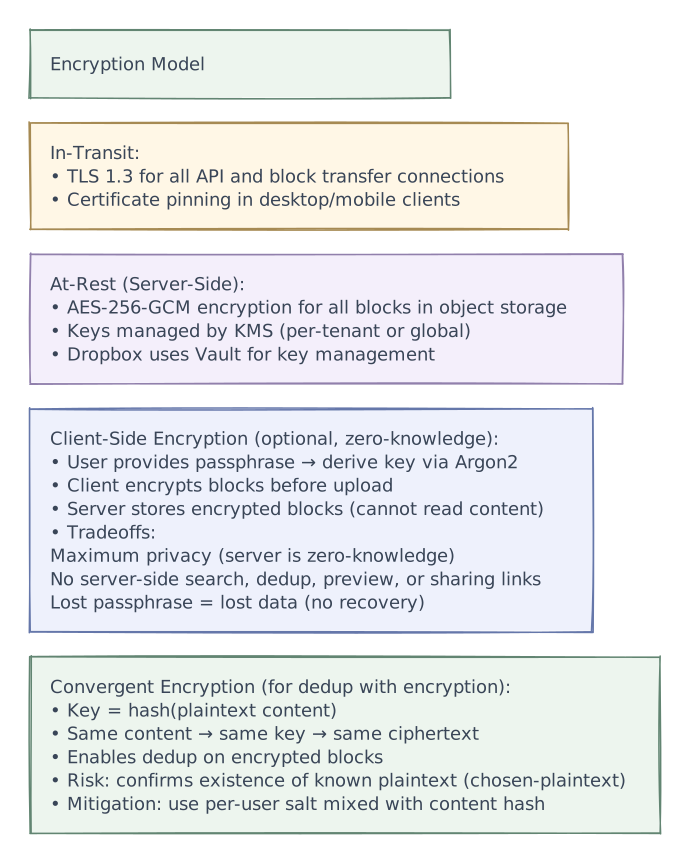
- Store immutable encrypted blocks and reference them from file manifests.
- Notification service
- Notify other devices of changed revisions; clients still reconcile against the authoritative manifest.
Data Model
File Metadata

File Version History

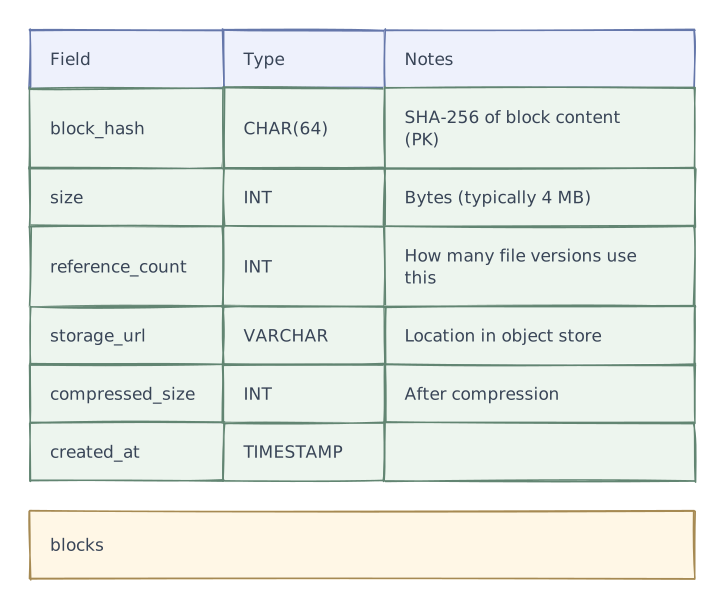
Block (Content-Addressable Storage)

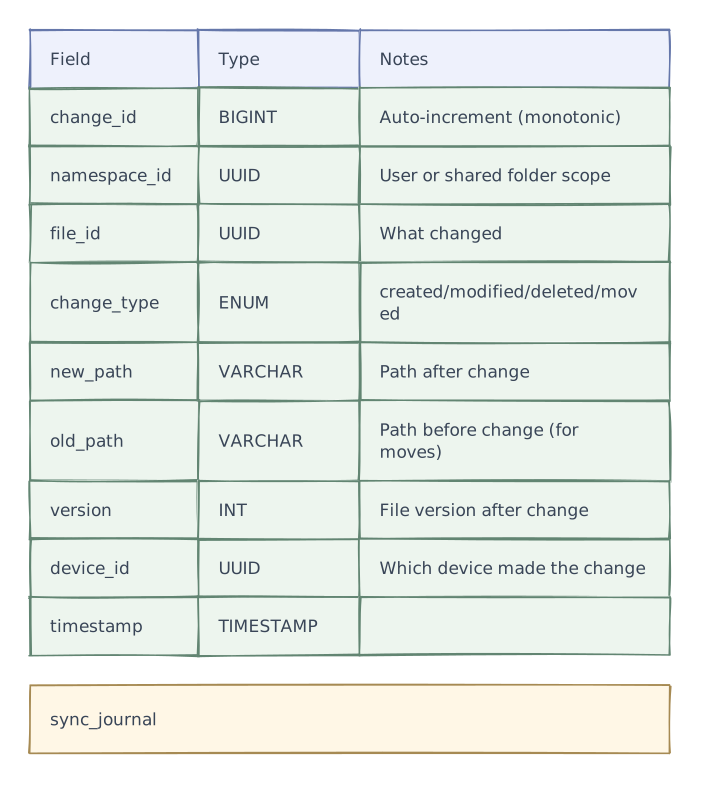
Sync Journal (Change Log)

Core design decisions
Core Design Decisions
Decision 1: File Chunking Strategy
The most important design decision. How files are split into blocks determines dedup efficiency, transfer efficiency, and delta sync capability.
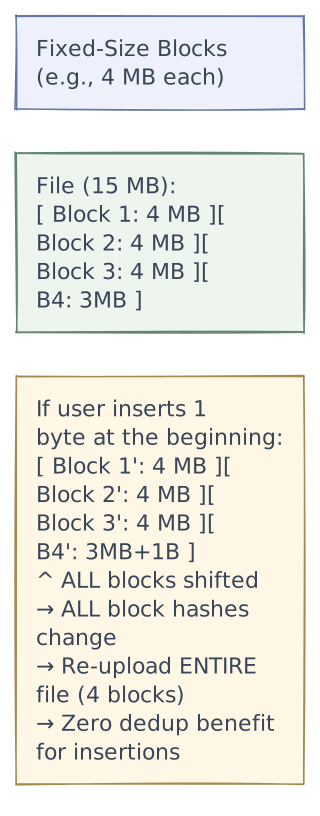
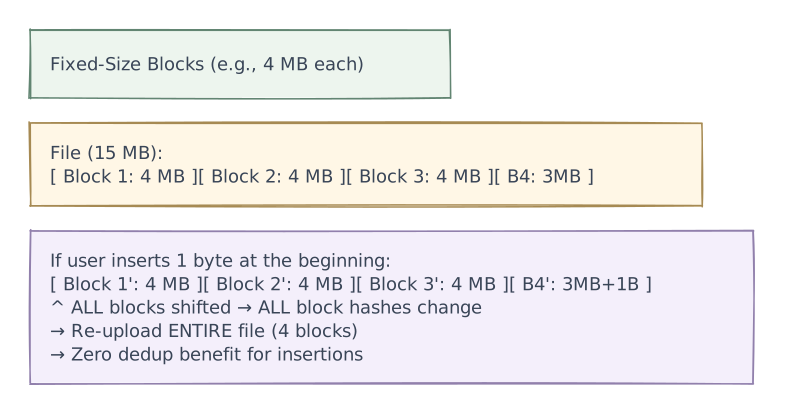
Option A: Fixed-Size Chunking
| Pros | Cons |
|---|---|
| Simple implementation | Insertions/deletions shift all subsequent blocks |
| Predictable block sizes | Poor delta efficiency for text files |
| Good for append-only files | No dedup for shifted content |
Option B: Content-Defined Chunking (CDC) — Recommended

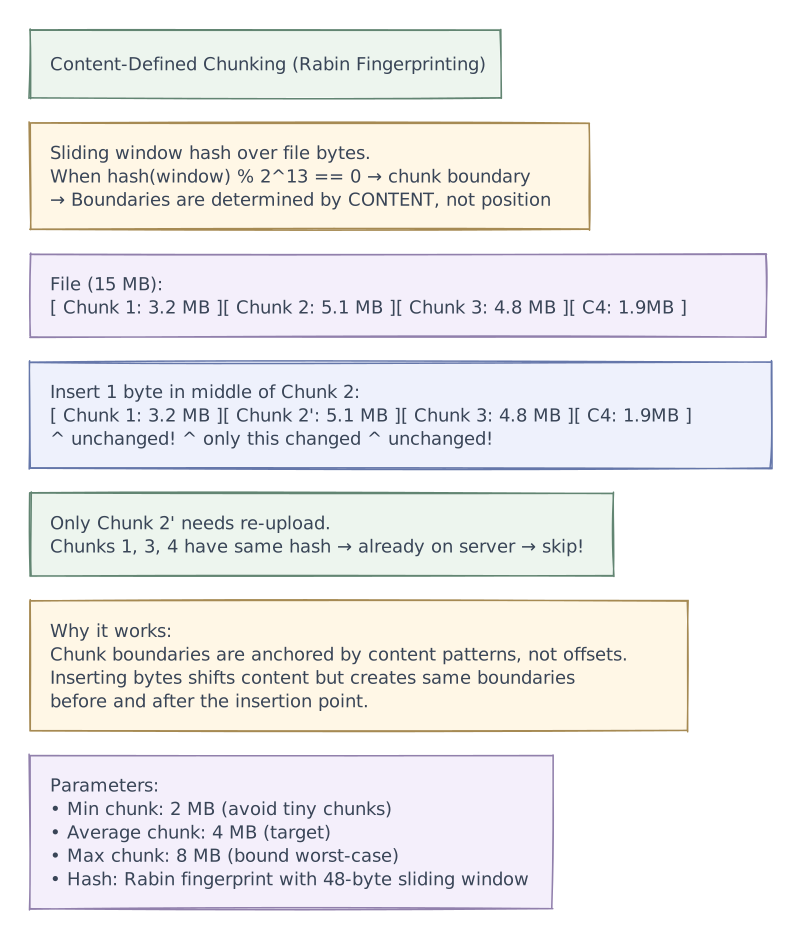
| Pros | Cons |
|---|---|
| Only changed chunks re-uploaded | Variable chunk sizes (slightly more complex) |
| Excellent dedup across file versions | CPU cost for rolling hash computation |
| Handles insertions/deletions gracefully | Min/max bounds add implementation complexity |
| Cross-file dedup (same content → same hash) |
Recommendation: Content-Defined Chunking (CDC)
This is what Dropbox uses. The delta efficiency alone saves 60-80% of upload bandwidth.
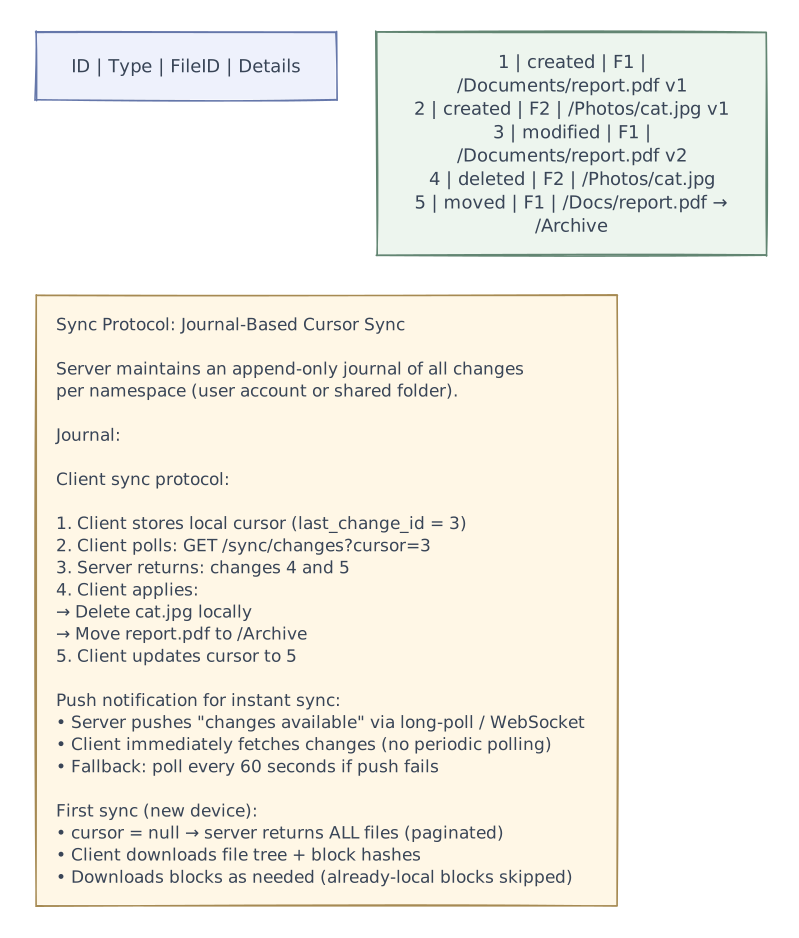
Decision 2: Sync Protocol — How Devices Stay in Sync

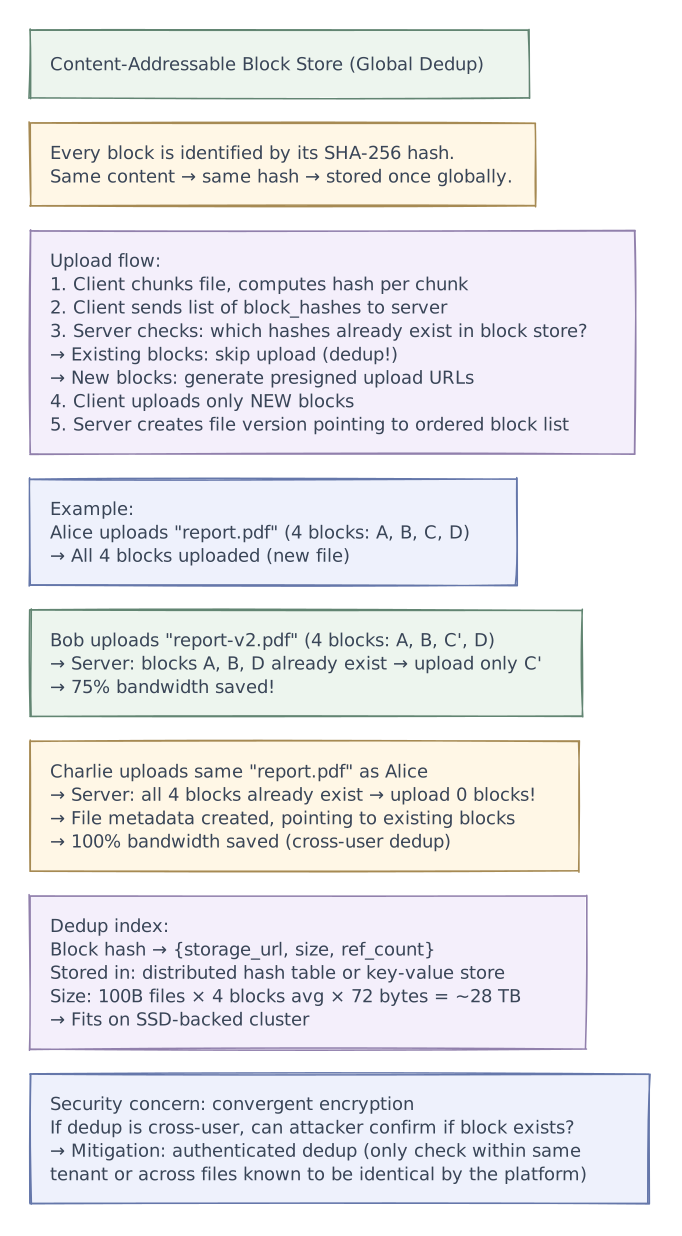
Decision 3: Deduplication Architecture

Request flows
Detailed Flow Diagrams
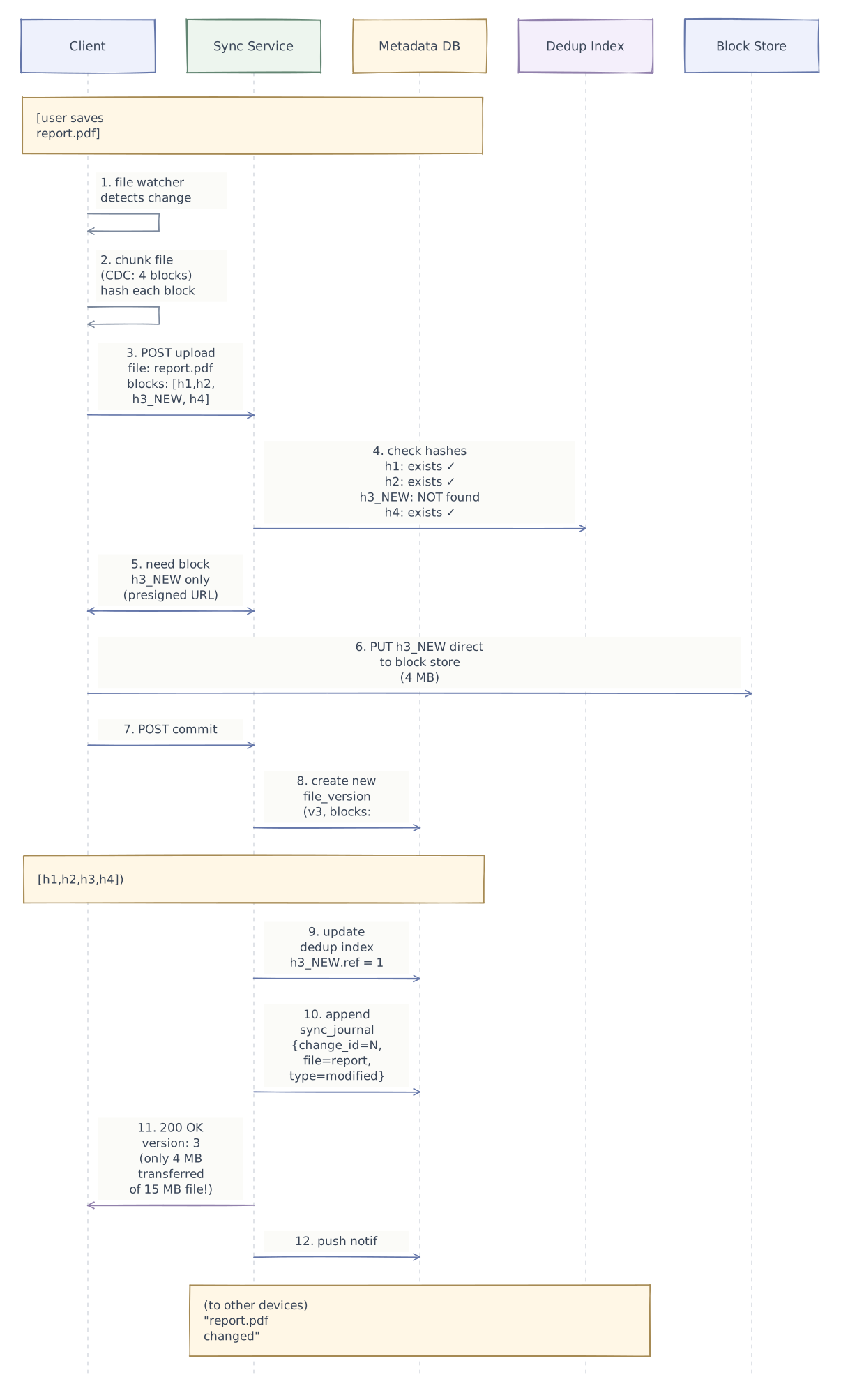
File Upload (Edit) Flow

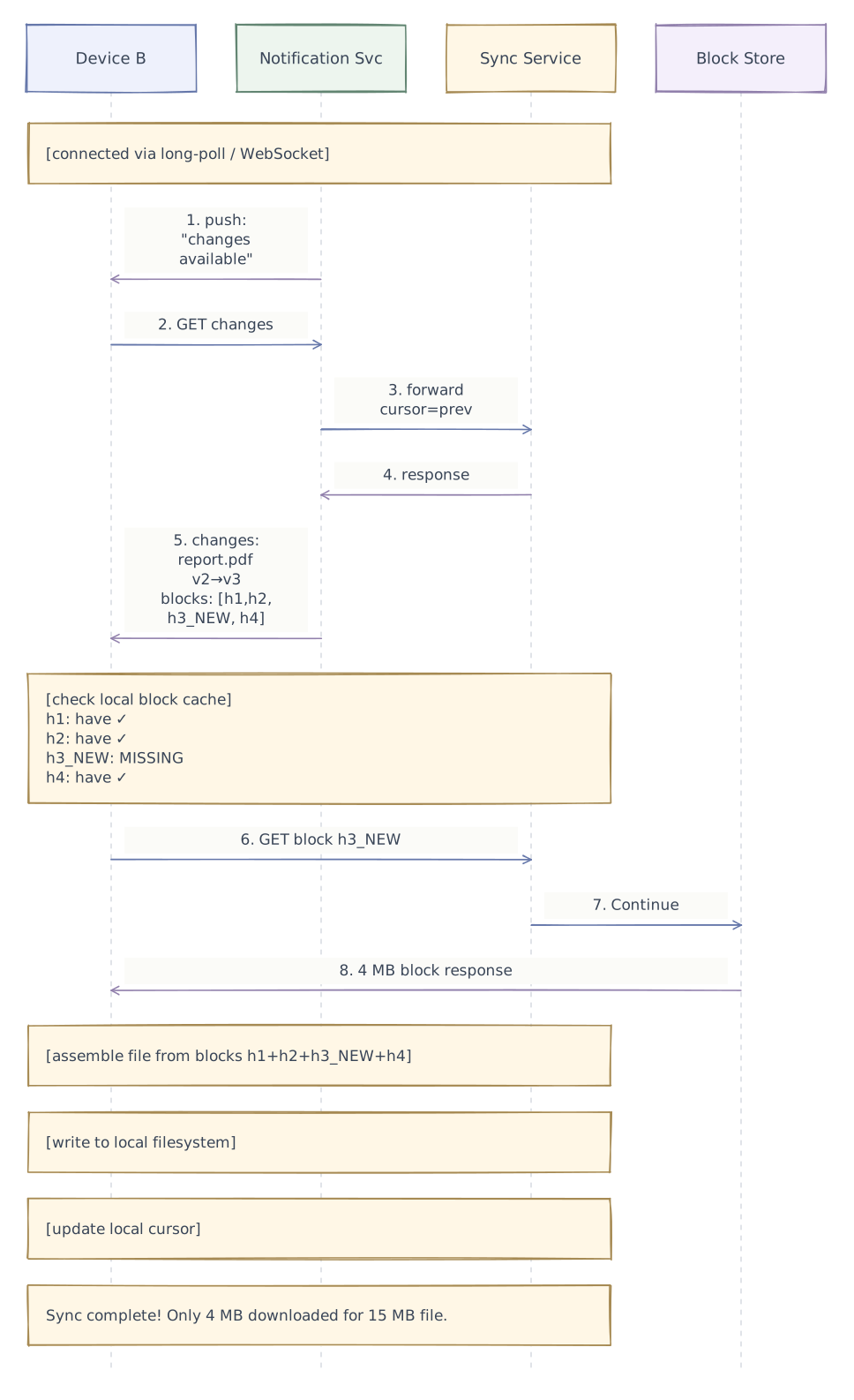
Sync to Other Devices

Conflict Resolution Flow

Performance & caching
Block Storage & Deduplication
Storage Architecture
Dedup Savings Calculation

Advanced design
Security & Encryption

Smart Sync / On-Demand Files

Edge cases
Handling Edge Cases
Large File Upload (10 GB+)
Problem: 10 GB file upload over unstable network

Solution: Resumable chunked upload

  1. Client chunks into 4 MB blocks (2,500 blocks for 10 GB)
  2. Client uploads blocks in parallel (4-8 concurrent uploads)
  3. Each block upload is independent:
     → If one fails, retry just that block (not entire file)
  4. Server tracks which blocks received via upload_id
  5. Client can query: GET /upload/{id}/status → {received: [h1,h2,...]}
  6. On connection drop: client resumes uploading missing blocks
  7. After all blocks received → commit

  Progress tracking:
  → Client shows: "Uploading report.zip: 1,847 / 2,500 blocks (73%)"
  → Accurate even after reconnection (server knows exact state)
Rename/Move Folder with 100K Files
Problem: User renames "/Projects" to "/Archive/Projects"
  → If we update 100K file paths individually = slow + risky

Solution: Path is computed, not stored per-file

  Option A: Store parent_folder_id (not full path)
    File stores: parent_folder_id = "folder-projects"
    Renaming folder = update ONE folder record
    → All children automatically resolve to new path via traversal
    → But: path computation on every read (join chain)

  Option B: Materialized path + batch update (Dropbox approach)
    Store full path per file (denormalized for fast reads)
    Rename = batch update all children:
      UPDATE files SET path = REPLACE(path, '/Projects', '/Archive/Projects')
      WHERE path LIKE '/Projects%' AND owner_id = ?
    → One SQL statement, batched (100K rows in < 1 second)
    → Sync journal: one "folder_moved" entry (not 100K entries)
    → Other devices apply the rename locally (not re-downloading files)

  Recommendation: Materialized path (Option B) — faster reads, bulk update
Account Runs Out of Storage
Quota: 2 TB for premium user, currently at 1.98 TB

Behavior:
  1. Upload attempted → would exceed quota → 413 Payload Too Large
  2. Client shows: "Storage full (1.98 / 2.0 TB)"
  3. Sync from other devices still works (download)
     → But new uploads blocked
  4. File deletions still work → free up space
  5. Grace period: if user exceeds quota (e.g., shared folder pushed over):
     → 30-day grace to delete files or upgrade
     → After 30 days: oldest files in trash permanently deleted
     → Never delete files outside trash without user consent

  Dedup-aware quota:
  → Blocks shared via dedup DON'T double-count against quota
  → User's quota = sum of unique blocks in their files
  → If block also in another user's files → counts for both users
    (conservative; ensures deleting one user's account doesn't
     leave the other over-quota)
Device Completely Out of Sync (New Device or Long Offline)
Scenario: New laptop connected to account with 200K files

Full sync strategy:
  1. Fetch file metadata tree (paginated, all 200K entries)
     → ~100 MB of metadata (200K × 500 bytes)
     → Downloaded in ~10 seconds

  2. Priority-based block download:
     → Recently modified files first
     → Starred/favorited files next
     → Largest files last
     → User can work while sync continues in background

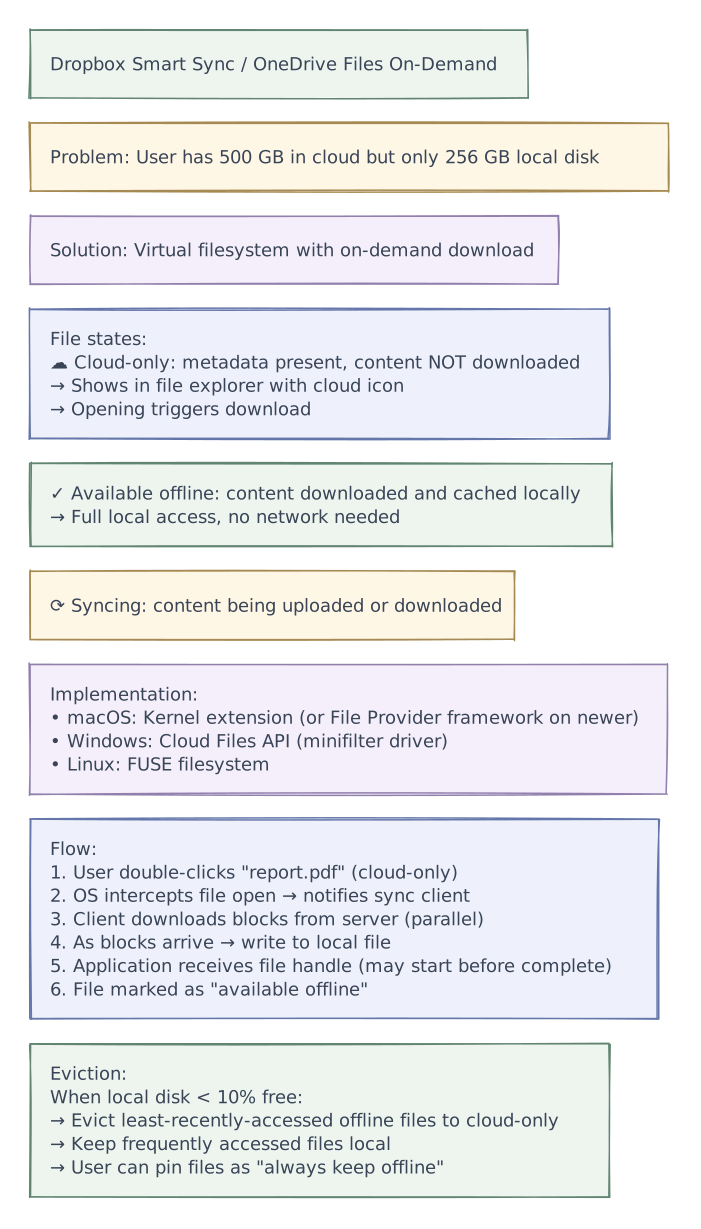
  3. "Smart Sync" / on-demand files (Dropbox Smart Sync):
     → Show all files in filesystem (placeholder files)
     → File appears as if it exists locally (has name, size, icon)
     → Actual content downloaded only when user OPENS the file
     → Saves: 200K files × 500 KB avg = 100 GB of disk space
     → Only ~5% of files are actively accessed → download ~5 GB

  Implementation:
  → Cloud Files API (FUSE on Linux, kernel extension on macOS/Windows)
  → Intercept file open() → trigger download → serve content
→ Mark frequently accessed files as "always available offline"Tradeoffs
Tradeoffs & Design Decisions Summary
| Decision | Option A | Option B | Chosen | Why |
|---|---|---|---|---|
| Chunking | Fixed-size blocks | Content-defined (CDC) | CDC | Handles insertions gracefully; only changed chunks re-uploaded; cross-version dedup |
| Sync protocol | Full-state comparison | Journal/cursor-based | Journal + cursor | Incremental; O(changes) not O(total_files); cursor enables resume |
| Sync notification | Periodic polling | Long-poll / WebSocket push | Push + poll fallback | < 1 second notification; polling as reliability backup |
| Deduplication | Per-user only | Global cross-user | Global (authenticated) | 30-50% storage savings; convergent encryption for security |
| Block upload | Through API server | Direct to object storage (presigned URL) | Direct + presigned | Avoids proxy bottleneck; API server handles only metadata |
| Conflict resolution | Last-writer-wins | Conflict copy | Conflict copy | No silent data loss; user decides; version history preserves all changes |
| File path storage | Computed from parent chain | Materialized full path | Materialized | Fast reads; bulk update for renames; sync journal records one event |
| Large file resume | Restart from beginning | Resumable block-level | Block-level resume | Individual 4 MB blocks retry independently; progress preserved on disconnect |
| On-demand files | Always download everything | Smart Sync (placeholders) | Smart Sync | 95% of files not actively used; saves 100+ GB of local disk per user |
| Metadata consistency | Eventual | Strong per-namespace | Strong | File tree must be consistent; cursor-based sync depends on ordered journal |
Reliability & fault tolerance
Phase 4 of 4 · Operations & resilience
Add operational safeguards
With the request paths and tradeoffs established, add the controls that help detect trouble and keep the system operating. The final diagram retains every layer introduced so far.
- Conflict + recovery
- Preserve conflicting versions and recover interrupted uploads without discarding either user's work.
Reliability & Fault Tolerance
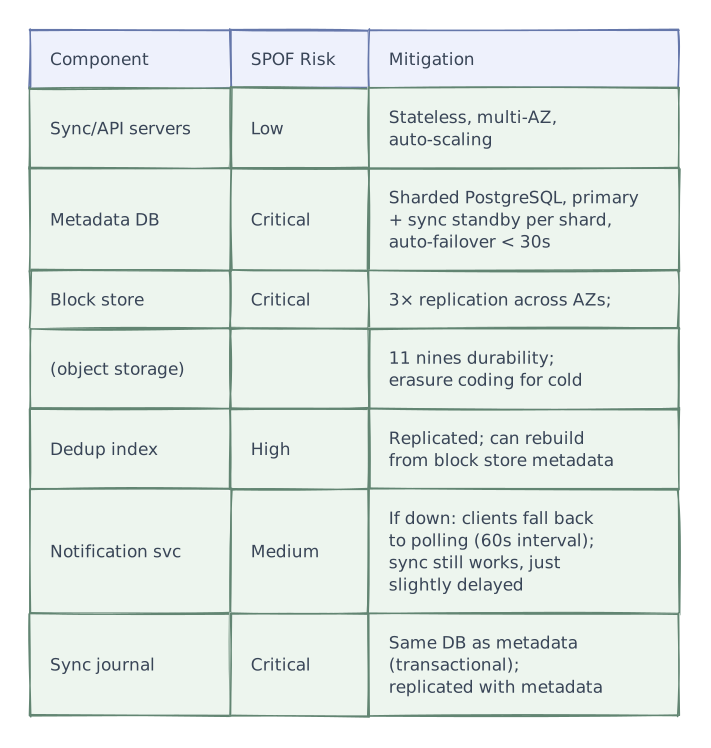
Single Points of Failure & Mitigations

Graceful Degradation
Tier 1 (Notification service down):
  → Clients fall back to polling every 60 seconds
  → Sync works, just 0-60s delay instead of near-instant
  → Core functionality unaffected

Tier 2 (Search index down):
  → File search unavailable
  → Browse by folder, upload/download, sync all work
  → Rebuild index from metadata DB

Tier 3 (One metadata shard down):
  → Users on that shard: files inaccessible briefly
  → Auto-failover to standby (< 30s)
  → Other users on other shards: unaffected

Tier 4 (Block store partially degraded):
  → Reads served from surviving replicas
  → Uploads to degraded AZ rerouted
  → Background repair restores full replication

Tier 5 (Client offline):
  → Full offline access to previously synced files
  → Changes queued in local SQLite DB
  → When online: changes sync automatically
→ This IS the normal mode for mobile devicesProduction architecture
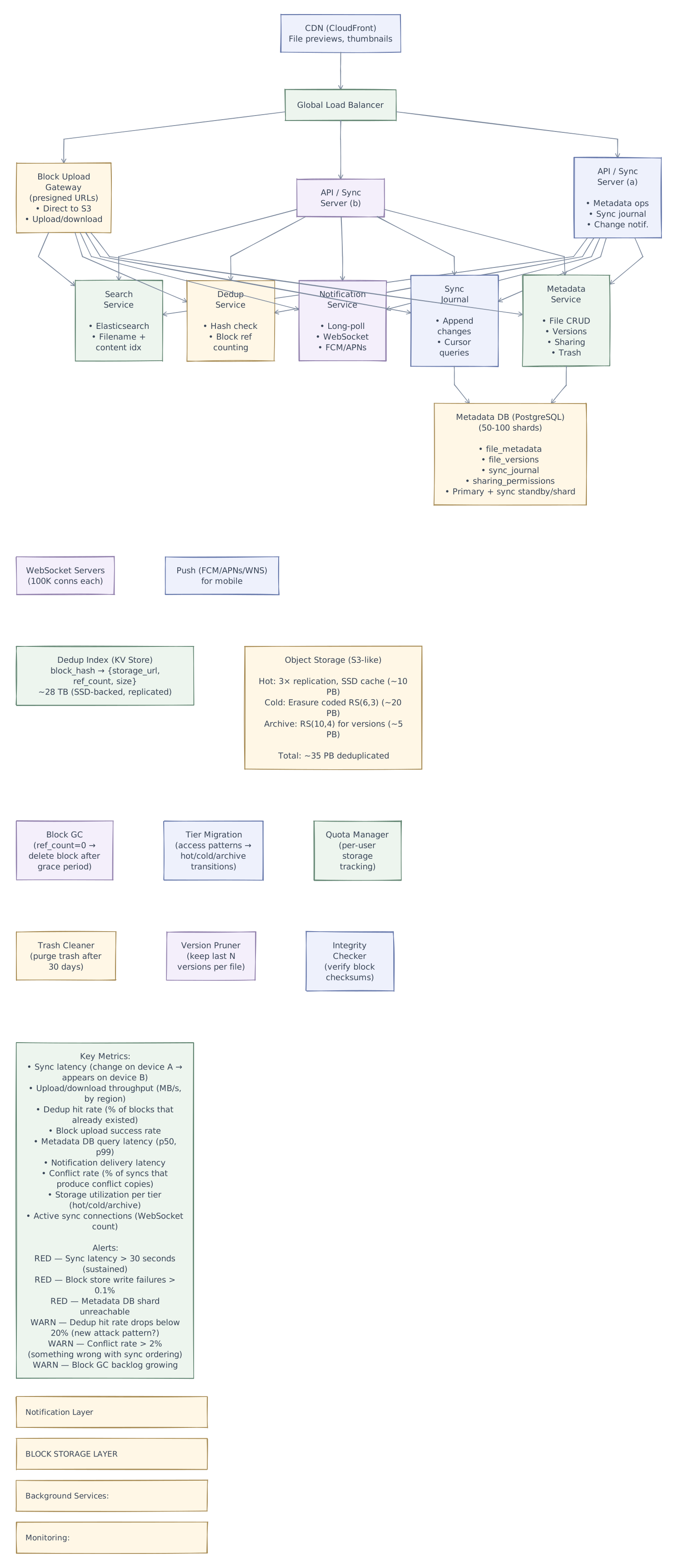
High-Level Architecture

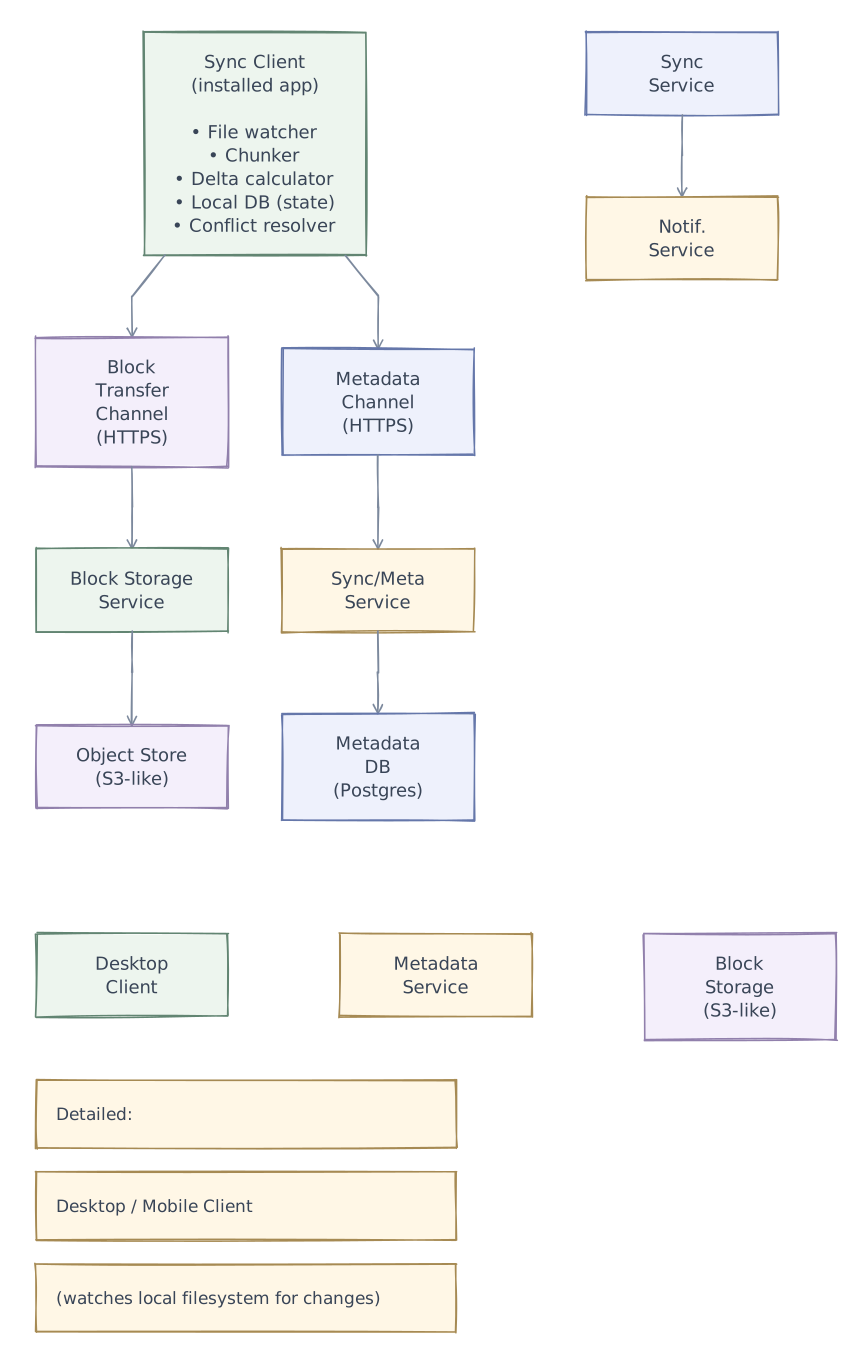
Component Breakdown

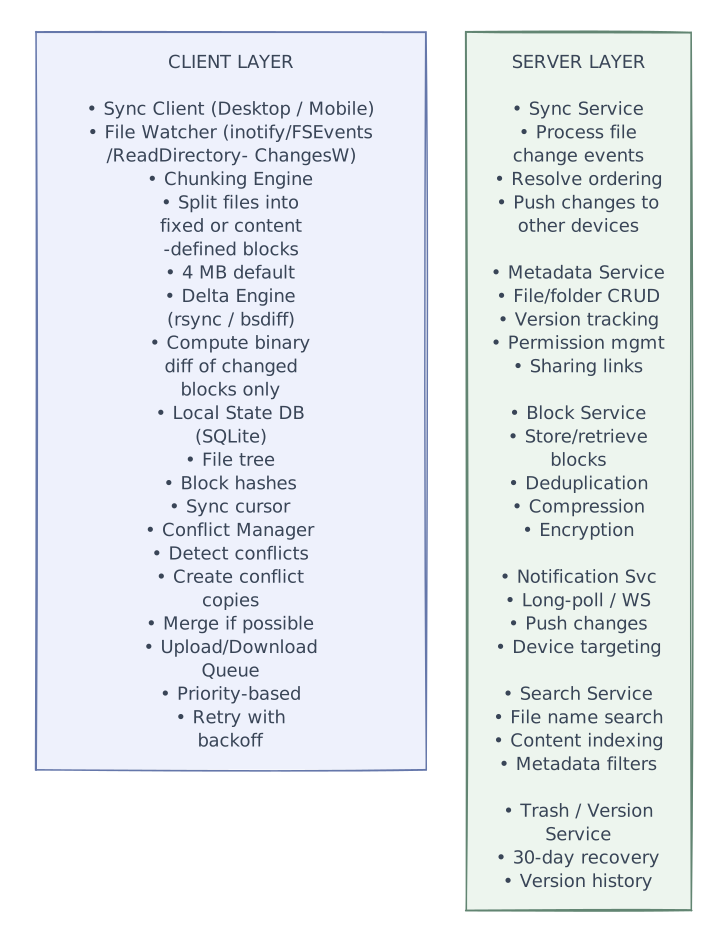
Full System Architecture (Production-Grade)

Further exploration
Rename a folder on one offline device while editing a file inside it on another. Stable file identities help distinguish a move from deletion followed by creation. Work through the merged folder tree, then add a genuine deletion and decide how long tombstones must survive for old devices to catch up safely.
Interview playbook
Interview Tips
Start with chunking — CDC is the key insight — "Files are split into 4 MB content-defined chunks using Rabin fingerprinting. Boundaries are determined by content patterns, not fixed offsets. This means inserting a byte only changes one chunk, not all subsequent chunks." This single decision enables delta sync, dedup, and bandwidth efficiency.
Deduplication saves 30-50% storage — Content-addressable blocks: same SHA-256 hash = same block, stored once. Works across file versions (edit changes 1 of 4 blocks → 75% reuse) and across users (10K users with same installer = stored once). This is how Dropbox stores 100B files in ~35 PB.
Journal-based sync with cursor — Don't describe "compare all files." Explain: server maintains an append-only change journal per namespace. Client stores a cursor (last_change_id). GET changes?cursor=N returns only what's new. O(changes) not O(total_files). This is how incremental sync stays fast.
Upload dedup flow — Client sends list of block hashes. Server checks dedup index. Returns: "I need only blocks X and Z (Y already exists)." Client uploads directly to object storage via presigned URLs. API server never proxies file content (only metadata).
Conflict resolution = conflict copies — Don't say "last-writer-wins." Explain: if two devices edit the same file offline, server detects base-version mismatch. Creates "file (conflicted copy - Device B).txt." No silent data loss. User decides which version to keep. Version history preserves everything.
Push notification + polling fallback for sync — Changes push to other devices via long-poll/WebSocket (< 1s). If push fails, client polls every 60 seconds. Offline devices sync on reconnect using their stored cursor. Three-layer reliability.
Smart Sync / on-demand files — "User has 500 GB in cloud, 256 GB local disk. Solution: virtual filesystem shows all files but downloads content only on open. Cloud-only files have metadata locally but zero disk usage. Evict least-recently-used files when disk is low." This is a modern differentiator.
Resumable upload at block level — 10 GB file = 2,500 blocks. Each block uploaded independently. Connection drops → resume from exactly where you stopped. Server tracks which blocks received. No re-uploading completed blocks.
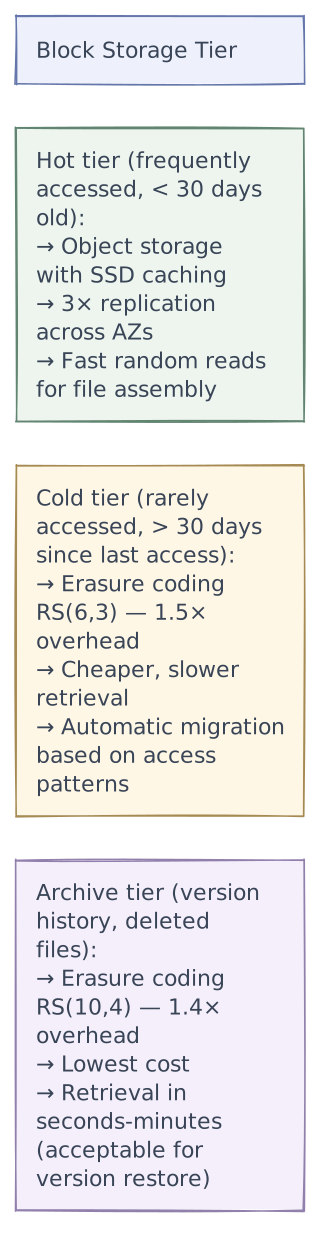
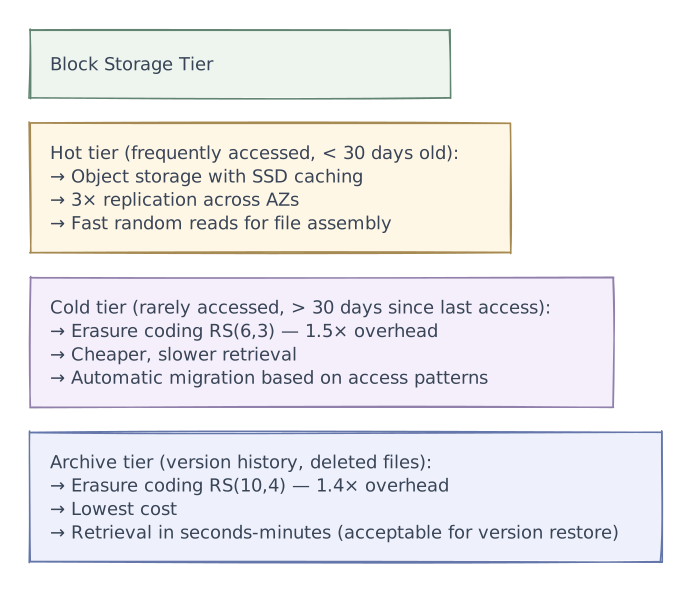
Block storage with tiered retention — Hot (3× replication, SSD cache) for recent files, cold (erasure coding RS(6,3)) for older files, archive for version history. Lifecycle migration based on access patterns. Same model as S3 storage classes.
End with scale numbers — "100B files chunked into ~400B blocks, deduplicated to ~35 PB of unique data. CDC saves 70% of upload bandwidth. Cursor-based sync handles 100K metadata ops/sec. Push notification propagates changes to other devices in < 2 seconds."